VideoAsk alternativeCollect video replies. Stop counting minutes.
A VideoAsk alternative for video, audio, and text answers. People record right inside your form. Start free, or choose Pro for $29/month with no monthly recording limit.
On Youform Free, a one-minute answer and a five-minute answer each count as one response. You get 25 recording responses each month across your organization. Pro removes that monthly limit for $29/month, under fair use.
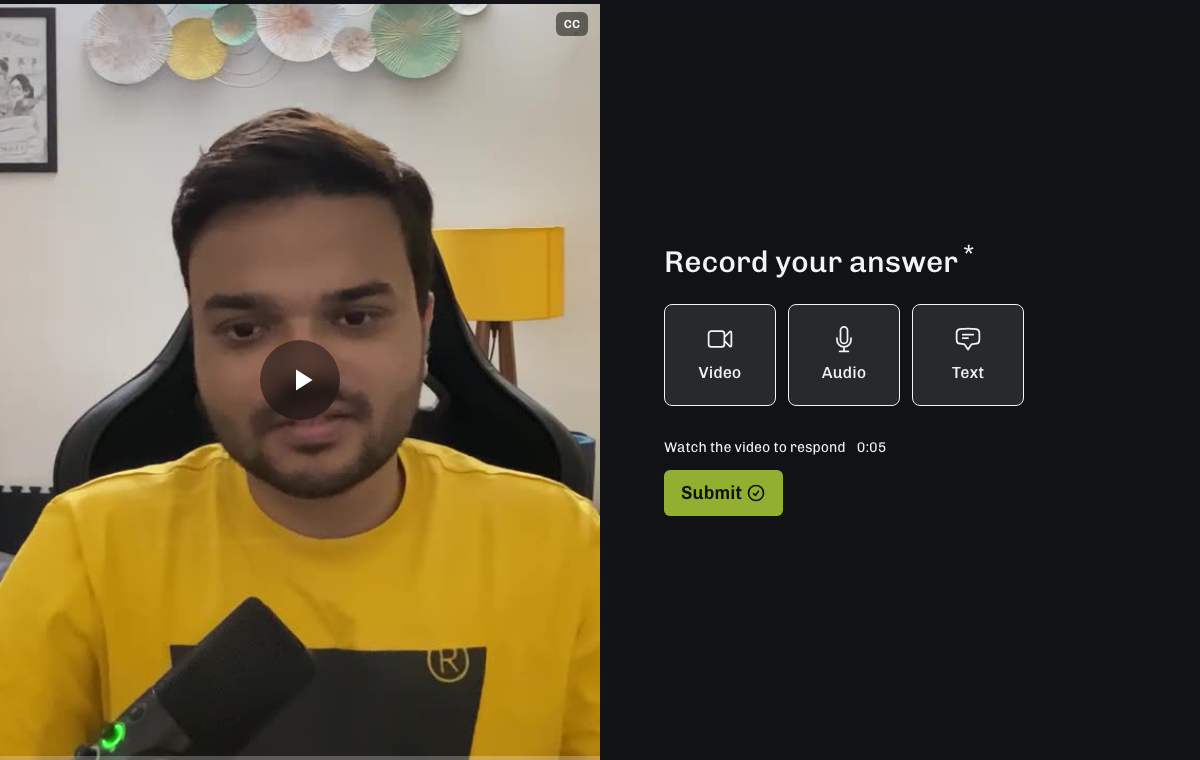
Record right inside the form
People choose Video or Audio and start recording. They can try again before sending, upload a file they already have, or type an answer when you allow it. No separate recording app is needed.
Get the video and the details in one place
Ask for a name, email, rating, file, or signature alongside a video answer. Show different follow-up questions with conditional logic. You can use the same builder for your other forms too.
Watch it, hear it, or read it
Open a response in Results to play or download the recording. Read a transcript when speech is detected. Your own question videos can have captions, a chosen thumbnail, and a trimmed start and end.
You want a video answer and the details that go with it.
Ask for a customer story, an applicant introduction, or a client brief. Collect the recording, name, email, and other answers in one form. Choose Youform when that is the job you need done.
VideoAsk supports live calls and back-and-forth video replies. If you use those every day, keep them in mind before switching. Youform collects answers through a form.
Live calls. VideoAsk lets people call you from a form on paid plans. Youform’s recording block is for answers you review later.
Back-and-forth replies. VideoAsk lets you reply to a response with another video or audio message. Choose it if that ongoing conversation is part of your service.
THE PRACTICAL DETAILS
What comes with the plan?
Youform vs. VideoAsk: how people answer, how usage is counted, and what happens when you need more.
Scroll sideways to compare Youform with VideoAsk
Youform vs VideoAsk: selected features and plan details, reviewed 10 November 2026
What matters
Youform
VideoAsk
How usage is counted
Free counts responses with recordings. Pro has no monthly recording limit; fair use applies.
Counts the minutes of new video and audio you create or receive.
Longer answers
A one-minute and a five-minute recording each count as one response.
Longer recordings use more processing minutes.
Record inside the form
Yes. Record, retry, or upload a file.
Yes. People can record video or audio answers.
Audio and typed answers
Enable video, audio, and optional text answers.
Open-ended questions accept video, audio, or text.
Your own question videos
Record or upload on every plan. Add captions, trim playback, and choose a thumbnail.
Add your own video. New recordings and uploads use processing minutes.
Recording length
Up to 5 minutes on every plan, including uploaded recordings.
2 minutes by default; up to 5 on paid plans. Uploaded videos can be longer.
Video upload size
Up to 500 MB per recording, with a 5-minute limit.
Up to 500 MB per uploaded video answer, with no length limit.
Live calls and video replies
Collect answers in a form.
Live calls on paid plans, plus back-and-forth video or audio replies.
When the allowance runs out
On Free, people can still type. Pro and Business keep collecting recordings under fair use.
Recordings still arrive, but you cannot view them until you upgrade or your allowance resets.
Start with 25 video/audio responses per organization each month for free. Need more? Youform Pro is $29/month, or $20/month when billed $240 yearly. Pro has no monthly recording limit and also includes your logo, branding removal, and custom domains. Each recording can be up to 5 minutes and 500 MB. Fair use applies.
Start with one form. Keep a copy of your old videos and responses before replacing the link. You will rebuild the form yourself; there is no automatic VideoAsk importer.
Create a Youform and add your questions, including any names, emails, ratings, or file uploads you need.
Record or upload your question video. Add a Video & Audio block and choose whether people can also type an answer.
Check the form on your phone and computer. Review captions, recording choices, required questions, and any follow-up logic.
Connect your notifications and integrations, then share the new link or embed it on your website.
Yes. Video questions work on every plan. Free includes 25 video and audio responses per organization each month, shared across all forms. Text responses stay unlimited under fair use. You do not need a credit card to start.
Does Youform charge by the minute?
No. Free counts responses that contain a video or audio recording. Each submission counts once, even with several recordings. Pro and Business have no monthly recording limit, under fair use. A recording can be up to 5 minutes and 500 MB on every plan.
Can people record a video without leaving the form?
Yes. They choose Video or Audio, record their answer, then keep it or try again. They can also upload a recording they already have. If their browser cannot record, they can upload a file instead.
Can people type instead of recording?
Yes. Turn on Allow text answer for the Video & Audio block. People can then choose to type. Text answers also remain available after the Free recording allowance runs out.
What happens after the 25 free recording responses?
People can still answer in text. The recording allowance resets next month. Upgrade to Pro or Business to keep collecting recordings beyond the Free allowance, under fair use.
Can I add my own video to a question?
Yes. Choose an eligible question, switch its format to Video, and record or upload your video. You can edit captions, choose a thumbnail, trim playback, and set how much people must watch before answering.
Can I collect video testimonials or applicant introductions?
Yes. Ask your question, collect a video answer, and review it in Results. Add names, emails, and other questions to the same form. Ask permission before publishing someone’s video.
Where do I watch or download the answers?
Open a submission in Results to play or download the recording. You can read a transcript when speech is detected. Video and audio answers are not included in the Summary view.
Can I put a video question inside a multi-question page?
No. Video questions and Video & Audio blocks cannot be used inside a multi-question group. Put them on their own steps in the form.
Does Youform include VideoAsk’s live calls and video replies?
Youform collects video, audio, and text answers in a form. Use VideoAsk if you need live calls or want to send video replies back and forth.
Sources and how we compared
Published by Youform. We checked the linked product guides and pricing information on 10 November 2026. The Reddit post is one user’s request from May 2023. Prices and features can change; use the linked guides to check the details you need.