


A job application form template should collect a candidate's contact details, the role they want, relevant evidence, availability where needed, and a CV or portfolio. The first form should help you decide who merits a conversation, not reproduce every field in a legacy paper application.
Use the free general application form template as an editable online starting point, or copy the examples below into your own process. The examples are suggested edits, not a claim that every listed question is already present in the template.
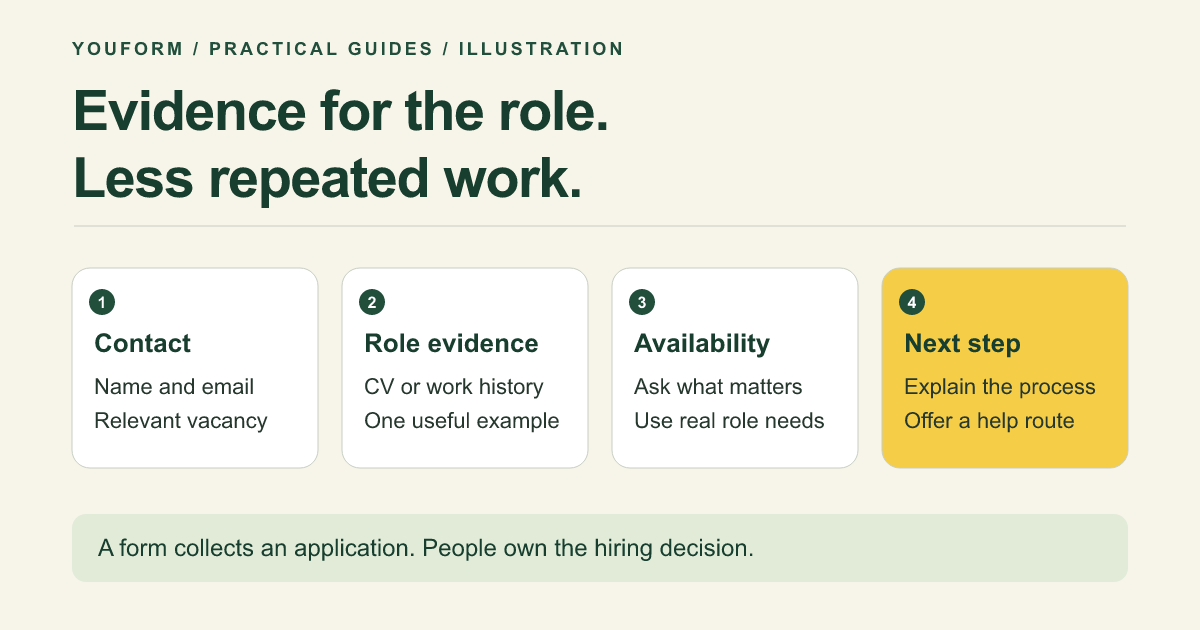
A simple job application form template
Replace the bracketed details and remove fields that do not serve the advertised role. Keep the job description, location or working arrangement, closing date, and expected next step visible before the questions.
Introduction
Apply for [role] at [organization]. We will use your application to review your suitability against the published role requirements. Applications close on [date]. [Hiring team] will contact shortlisted applicants by [date or process]. Read [recruitment privacy notice]. For an accessible alternative or help applying, contact [hiring contact].
Core questions and suggested fields
- What name should we use when contacting you? Short text.
- What email address should our hiring team use? Email field.
- Which role are you applying for? A real vacancy list if using one form for several roles; omit it when the role is already fixed.
- What experience or skills are most relevant to [specific role requirement]? Short paragraph. Ask for evidence, not a generic claim of being a “great fit.”
- Please share your CV or relevant work history. Upload or a reasonable text alternative. Do not demand both a CV and a complete re-entry of every job.
- Where can we view relevant work, if applicable? Optional portfolio or professional profile link.
- When could you start, if selected? Date or notice-period choices, where useful to the hiring process.
- Is there anything relevant to your application you have not covered? Optional text with a note not to include unnecessary sensitive personal information.
Closing message: “Thank you for applying. [Describe the actual next step and expected timing.] Keep a copy of the role details. For questions about this application, contact [hiring contact].” Do not promise an automatic confirmation email unless you have configured and tested that workflow.
Example: an hourly or shift-based role
For a retail assistant role, replace the portfolio question with availability relevant to the advertised schedule. Show the actual shift pattern first so applicants can make an informed choice.
- “Which of the advertised shifts could you regularly work?” List real shifts and allow multiple selections.
- “Can you work at [published location or locations] under the arrangement described?” Use clear role-related choices and a place to ask a question.
- “Tell us about a time you helped someone resolve a problem.” Use a short answer if this evidence genuinely matters to the role.
Do not ask why someone cannot work a particular shift or require details of family responsibilities. Record availability consistently and offer an alternative way to explain a role-related requirement. Availability is not a proxy for commitment or character.
Example: a specialist or portfolio-based role
For a designer, developer, or other specialist, one focused evidence question can be more useful than a long personality questionnaire.
- “Share one example relevant to [published requirement].” Accept a suitable link, upload, or description.
- “What was your role in that work?” Distinguish individual contribution from a team result.
- “What constraint influenced your approach?” Keep the request small enough for an initial application.
Explain that applicants should not share confidential client material. A brief application is not the place to require a large unpaid project. If you use an assessment later, state its purpose, time expectations, and how it will be evaluated.
What not to put in the first application
Collect information for the current hiring decision, not because an old template contains a field. Leave out banking details, government identity numbers, medical histories, unrelated family information, and broad sensitive-data questions. Separate any necessary later-stage checks from the initial application.
Rules differ by jurisdiction and the type of role. In the United States, the EEOC's pre-employment disability guidance limits disability-related questions before an offer and describes specific exceptions. Do not turn a general template into a request for medical disclosure. Have your local hiring requirements and wording reviewed where needed; this is a form-design guide, not legal advice.
Offer a separate accessible contact route rather than asking candidates to disclose a diagnosis inside the application. If you need voluntary monitoring information, use an appropriately separated process and access rules rather than exposing it to the selection reviewer.
Online form, Word, or PDF?
An online form suits a shared link, structured answers, and a consistent review queue. A document can be useful when applicants need an offline option. Acas provides free Word and OpenDocument application templates; those are external document downloads, not Youform-generated files.
This article provides copyable questions and an editable Youform starting point. It does not offer a downloadable PDF disguised behind a signup link. Choose the format that candidates can actually use and give them a clear submission route.
Set up the application in Youform
- Copy the general application template. Replace organization, role, requirements, and dates. Remove irrelevant fields.
- Check uploads. Youform Free supports files up to 10MB. State the formats and evidence you need, and provide an alternative for applicants who cannot upload a file.
- Keep branching relevant. Use logic for role-specific questions instead of making every applicant complete every vacancy's section.
- Set access before sharing. Decide who sees CVs, comments, notifications, and any connected spreadsheet. Do not publish a response sheet.
- Preview as an applicant. Check required fields, upload instructions, phone layout, closing message, and the contact alternative. Avoid using real applicant information in testing.
Youform includes unlimited forms and responses on Free. Custom branding and respondent emails are paid features; see current plans. A form is not an applicant tracking system, a screening decision engine, or proof that your recruitment process meets every legal requirement.
Review against the role, not the polish of the form response
Define the essential criteria before reading applications. Keep a simple review record linking each criterion to the evidence supplied, with a consistent next-step decision. Do not use unrelated personal details or automated sentiment to decide who should be interviewed.
If a CV is missing or a link fails, follow a consistent missing-information process. Set a retention approach for applications and attachments, and explain it in the recruitment notice. The person administering the form should know how to handle a candidate's access or correction request through your established process.
Job application form FAQs
Can I use the template for free?
Yes. The general application template can be copied into a Youform account, and Free includes unlimited forms and responses. Review file size, branding, collaboration, and email requirements against the current plan table.
Should a job application require a cover letter?
Only if you have a clear use for it. A focused question about one essential requirement may supply better first-review evidence with less repeated work. Tell applicants what you will evaluate.
Can one form cover multiple vacancies?
Yes, with a real role selector and relevant branching. Keep job descriptions and review criteria distinct. Separate forms may be simpler when vacancies require very different evidence or have different owners.
Template examples, product scope, and linked hiring references reviewed November 10, 2026. No real applications were collected or evaluated for this guide.