


Start with the experience you want to improve. Useful customer feedback questions ask what the customer was trying to do, how the experience went, and what would make it better. A rating helps you compare responses; a focused follow-up explains what to change.
The examples below are a question bank for small businesses, product teams, and service providers. Choose the few that fit your decision rather than putting all 15 into one form. Adapt the wording to your own product, service, and audience.
Choose customer feedback questions around one decision
Write down the decision before the question. “Improve checkout” needs different information from “decide which product feature to build.” State the experience and timeframe: the order placed today, the setup just completed, or the support conversation that ended.
The GOV.UK Design System recommends asking only for information you need and explaining why you need it. For a business feedback form, that means each answer should have a reader and a possible next action.
Keep each question about one thing. Pew Research Center’s question-writing guidance explains why questions that combine concepts are difficult to interpret. “How satisfied are you with our price and delivery?” needs two questions if you want two separate judgments. See more double-barreled question examples.
Offer “Not applicable” or “I haven’t used this” when they are valid answers. A customer who has never contacted support should not have to invent a support rating. Keep the wording and scale consistent when comparing the same experience over time.
5 customer feedback questions after a purchase
Use these for an order, signup, or service booking. Name the actual event in the question so the customer knows what to evaluate.
- What were you hoping to achieve when you chose [product or service]?
Use an open-text answer to understand the customer’s goal. Compare the responses with the promise on your product or service page; do not assume every buyer has the same job.
- How easy or difficult was it to complete your purchase?
Offer a balanced scale from “Very difficult” to “Very easy.” Use this for the purchase process, not as a combined rating of the product, price, and delivery.
- What, if anything, made the purchase difficult?
Ask as a follow-up to a difficulty rating. A specific answer such as a confusing delivery option can become a task for the checkout owner.
- Was any information missing before you decided to buy?
Offer Yes, No, and Not sure, with an optional “What was missing?” follow-up. Use repeated requests to review the product page, FAQ, or proposal.
- What is one thing we could improve about the buying experience?
Keep the scope on buying. A request about payment, booking availability, or the confirmation message belongs to a different owner from a product feature request.
5 customer feedback questions about using a product
Ask after the customer has had a relevant opportunity to use the product. Make the task explicit instead of asking for a judgment about everything.
- What were you trying to do when you last used [product]?
Use this to interpret the rest of the response. Someone setting up their first project may need different help from someone repeating a familiar task.
- Were you able to complete that task?
Offer Yes, Partly, No, and an appropriate uncertainty option. Let unsuccessful customers describe where they stopped instead of sending them straight to a general satisfaction question.
- Which part of that task was hardest?
Ask for a step or action in the customer’s own words. Review the wording, navigation, or documentation for that step before deciding the answer requires a new feature.
- What do you find most useful about [product]?
Look for the parts customers want you to preserve. Avoid loading the question with adjectives such as “excellent” or “powerful.”
- What would you change first to make [task] easier?
Ask for one priority. Follow up on the underlying problem before treating a proposed solution as a development requirement.
5 customer feedback questions after a support conversation
Refer to the specific conversation. Give people a way to say the issue is still open, and separate resolution from the quality of communication.
- Has the issue you contacted us about been resolved?
Offer Yes, Partly, No, and Not sure. An unresolved issue needs an operational follow-up, even when the customer gives the team a good rating.
- How easy or difficult was it to get the help you needed?
Use a balanced difficulty scale. Review the route to support and any repeated steps when customers describe effort getting help.
- How clear was the explanation you received?
Ask separately from response speed. A quick reply and a useful explanation are different things.
- What, if anything, should we have explained differently?
Use a text answer to identify missing steps, unfamiliar language, or an example that did not fit the customer’s situation.
- Would you like us to contact you about this feedback?
Make follow-up a choice. If the answer is Yes, ask for the appropriate contact detail and explain who will use it. Do not quietly turn a feedback response into a marketing subscription.
A five-question customer feedback form to start with
For a small business reviewing one recent customer experience, try this starting set. Add or remove questions according to the decision you want to make.
- Which experience are you giving feedback about?
- How satisfied were you with that experience? Use a labelled scale from Very dissatisfied to Very satisfied, with Not applicable when needed.
- What worked well?
- What is one thing we could improve?
- Would you like someone to follow up? If so, collect the contact detail needed.
If the experience is already clear from the invitation, explain it in the introduction and skip the first question. Preview the form with someone who can represent the audience; check what they think each question means.
Start from a client feedback template or browse the feedback form templates. For a recurring satisfaction measurement, use a consistent customer satisfaction survey rather than changing the scale every month.
Set up useful follow-ups in Youform
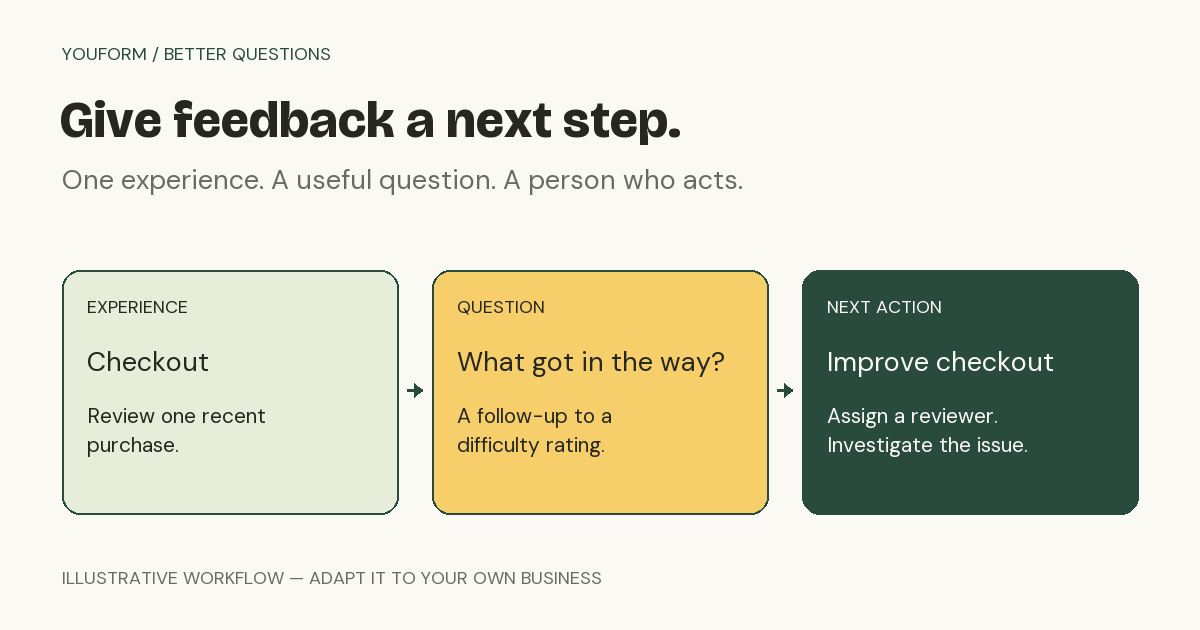
Build the main questions, then add only the follow-ups that are relevant. For example, ask someone who reports a difficult purchase what got in the way; ask for a reply address when someone wants a response. Youform’s conditional logic documentation explains how to configure rules. Test each path in your own form before sharing it.
The current Free plan includes conditional logic, website embeds, Google Sheets and Slack connections, and unlimited forms and responses within fair use. Adding your logo, custom domains, partial submissions, and advanced drop-off analytics require Pro. Connected tools may have their own fees.
Assign a person to review the replies. Group recurring issues by the experience they describe, record the action taken, and follow up where the customer has requested it. A feedback form collects information; it does not automatically fix an issue or update your CRM without a configured workflow.
When reviewing results, record how and when people were invited. Responses from one invitation method are not automatically representative of every customer. Look at the words alongside the ratings and keep a note of changes to the questions or process.
Create a free Youform account and adapt a template to the experience you want to improve.
Sources and review notes
Question-writing and product references reviewed on . The example questions and workflow illustration were created by Youform.