Google Forms Conditional Logic Guide

Google Forms Conditional Logic, Skip Logic & Branching — Explained

Google Forms has one branching feature — "Go to section based on answer" — and it only works on three question types. Here's exactly what it can do, where it falls apart, and how to get real field-level conditional logic on the free plan.

Free forever · Field-level conditional logic · Unlimited responses

wave decoration image

Does Google Forms have conditional logic?

Sort of. Google Forms has one branching feature called "Go to section based on answer." It lets you route respondents to different sections of the form based on a single multiple-choice, dropdown, or linear-scale answer. That's it. No field-level rules, no AND/OR conditions, no logic on text or checkbox fields.

For a simple decision-tree survey it works. For anything more — a real intake form, a quiz with scored branches, a multi-step questionnaire that hides irrelevant fields — you'll hit the wall fast. Here's how to set up what's available, and where it breaks.

How to add Google Forms conditional logic (the native way)

  1. 1

    Add a section break

    In the form editor's right sidebar, click the "Add section" icon (looks like two horizontal lines). Each branch of your form needs to live in its own section.

  2. 2

    Open the branching question

    Click on a multiple choice, dropdown, or linear scale question. Click the three-dot menu and choose "Go to section based on answer." This option is greyed out on every other question type.

  3. 3

    Map each answer to a section

    Next to each answer option, pick a target section from the dropdown. Route to "Submit form" to end the form early, or to a specific section to branch the flow.

  4. 4

    Set what each section does after

    At the bottom of each section, choose what happens next — continue, jump to a specific section, or submit. This is the only way to control the flow back together after a branch.

⚠️ The catch

Branching is locked to three question types (multiple choice, dropdown, linear scale) and operates at the section level only. You can't show or hide individual questions, can't trigger logic from a text answer, can't combine multiple conditions, and can't drive scoring or calculations from logic.

Where Google Forms conditional logic falls apart

"Go to section based on answer" sounds powerful in the docs. In practice, you'll run into one of these walls within the first ten minutes of building any non-trivial form.

🚫
No field-level show/hide
You can jump to a different section, but you can't make a single question appear or disappear inside the current section. So "ask their company name only if they pick Business" forces you to spin up a whole new section just for one field.
🔤
No logic on text, checkbox, or upload fields
Branching only fires from multiple choice, dropdown, or linear scale. If your trigger answer comes from a short-answer field, checkbox group, date, or file upload, you can't branch on it — period.
No multiple conditions (AND/OR)
Real-world rules look like "show this section if Country = US AND Plan = Enterprise." Google Forms can only do single-answer triggers. You can't combine conditions, can't reference earlier answers, can't build compound logic.
🏗️
Section bloat for simple flows
Because every branch needs its own section, a moderately conditional form turns into a maze of 8-12 sections you have to manually wire together. Reorder one and the routing breaks silently.
🧮
No conditional scoring or calculations
Quiz mode has fixed scoring per answer. There's no way to do "if score > 50, send to section B" or "calculate price = qty × $20 from earlier answer." Logic and math live in separate worlds.
🎯
No multiple endings
Every Google Forms submission ends at the same confirmation message. You can't show a different thank-you page based on the path the respondent took.

90,000+

Users worldwide

10M+

Responses collected

100%

Free forever

4.8/5

User rating

A real conditional logic builder — free, on every field

Youform is a free form builder with field-level conditional logic baked in. Show or hide any question, branch to any section, score with calculations, route to multiple endings — all driven by rules you build with a clean visual builder, on every question type, with as many conditions as you need.

What you can build in Youform's logic editor

👁️
Show/hide any single field
"Show 'Company name' only if 'Account type' = Business." No section workaround required.
🔀
Branch on every question type
Text, dropdown, checkbox, date, file upload, scale, signature — all can drive logic.
&
Multi-condition rules (AND / OR)
"Show this section if Country = US AND Plan = Enterprise" — exactly the kind of rule Google Forms can't express.
🧮
Score & calculations
Sum, multiply, or weight answers and branch on the result. Build real quizzes and price calculators inside the same form.
🎯
Multiple endings
Show a different thank-you screen — or redirect to a different URL — depending on the path the respondent took.
💬
Answer piping
Insert earlier answers into later question text. Hi {{first_name}}, ready? — personalisation Google Forms can't do.

Everything above is on the forever-free plan with unlimited forms and unlimited responses. No paywall on logic.

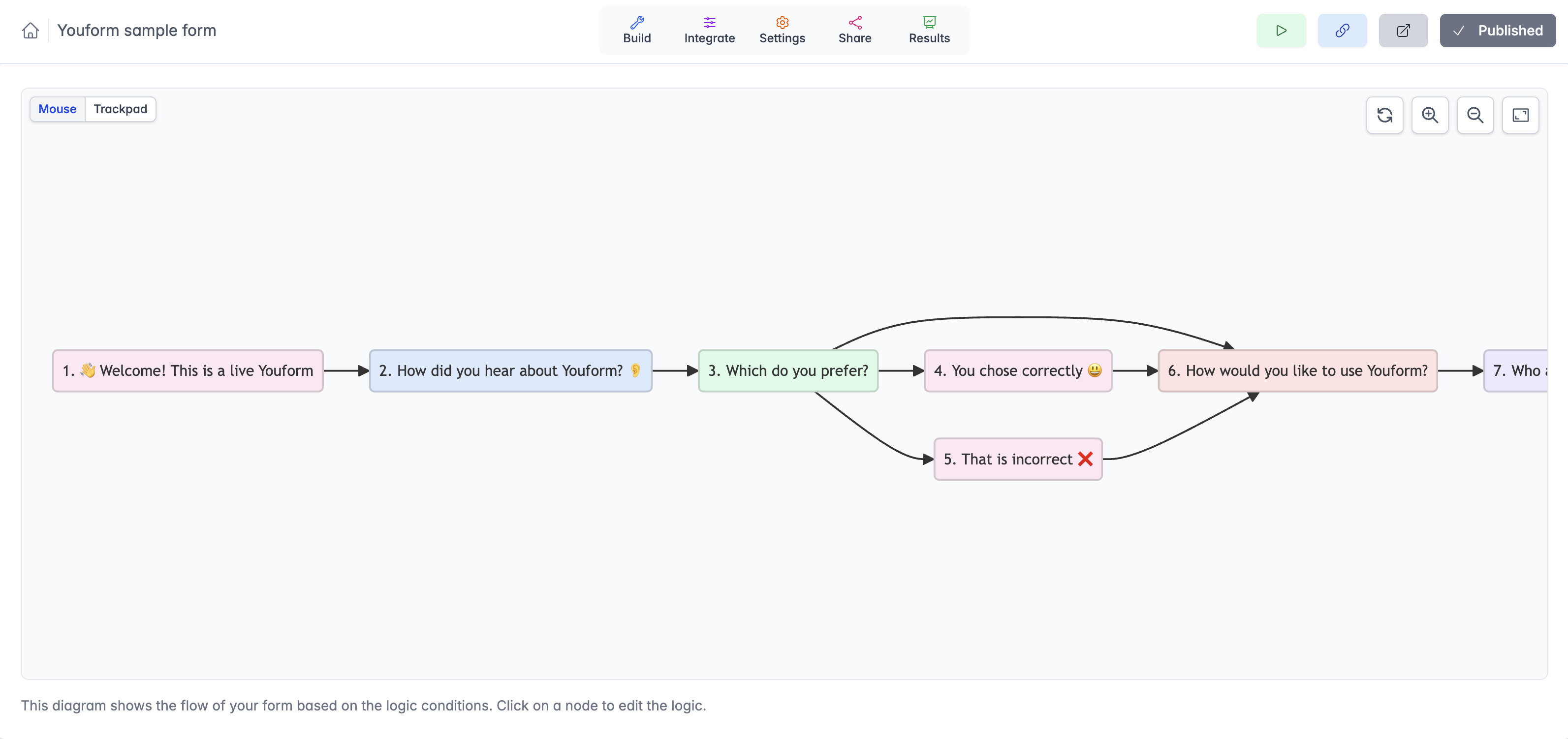
Youform's visual conditional logic builder showing a form with branching logic — question 3 routes to either 'You chose correctly' or 'That is incorrect' before rejoining the main flow.
Youform's visual logic builder — every node is a field, every arrow is a rule. Branch, skip, and rejoin on any question type.

What you get vs. Google Forms' "Go to section"

  • Field-level, not just section-level — hide one question without spinning up a whole new section.
  • Works on every question type — text, checkbox, date, file upload, scale, signature can all trigger logic.
  • AND/OR multi-condition rules — compose real-world logic that Google Forms can't express.
  • Score-driven branching — route to different sections (or endings) based on a calculated score.
  • Multiple endings + redirect — different thank-you screens or URLs per branch. (Redirect on Pro.)
  • Unlimited responses on the free plan — no submission cap on logic-driven forms.
Create free account

Conditional logic free on every plan. No credit card required.

One-click import

Already have a Google Form? Bring it over.

You don't have to rebuild from scratch to add real conditional logic. Paste your Google Forms URL into Youform's free converter — questions, options, multiple choice, and existing section-jump logic rebuild in seconds. Then layer field-level rules on top.

  • Preserves your existing sections and section-jump branches
  • Carries over every question type
  • Free — no signup required to try the converter
  • Add field-level logic, multi-condition rules, scoring after import
Convert your Google Form →

Paste a Google Forms URL

docs.google.com/forms/d/e/1FAIpQLSe...
Rebuilt in Youform
Add field-level rules
Publish with real logic

Google Forms conditional logic vs. Youform

Google Forms
(Go to section)
Youform
Field-level show/hide ❌ Section level only
Works on every question type ❌ Only MC, dropdown, scale
Multi-condition (AND/OR)
Score-driven branching
Multiple endings
Answer piping in question text
Calculations between fields ❌ (Quiz scoring only)
Cost Free Free

Loved by 90,000+ users

What our users say

Frequently Asked Questions

Does Google Forms have conditional logic?

Only in a very limited form. Google Forms has one branching feature called "Go to section based on answer" that only works on multiple choice, dropdown, and linear scale questions. You can't apply conditional logic to text fields, checkboxes, file uploads, or any other question type. There's no field-level visibility logic, no AND/OR conditions, and no way to show or hide individual questions based on previous answers — only entire sections. Youform has full field-level conditional logic on the free plan.

How do I add conditional logic to a Google Form?

Use "Go to section based on answer." Add section breaks in your form, then on a multiple choice, dropdown, or linear scale question, click the three-dot menu and choose "Go to section based on answer." For each option you can pick a target section. The respondent jumps between sections based on what they pick. That's the only form of conditional logic Google Forms supports — it doesn't work on other question types and can't hide individual fields.

What's the difference between skip logic and branching logic?

Skip logic skips a respondent past questions that don't apply to them. Branching logic sends them down different paths based on their answers — like a decision tree. Both are forms of conditional logic. Google Forms supports a basic version of both via "Go to section based on answer," but only at the section level and only on three question types. Youform supports both, on every field, with multiple conditions per branch, on the free plan.

Can Google Forms hide questions based on previous answers?

No. Google Forms can only jump to a different section based on an answer — it can't hide individual questions within a section, and it can't show extra questions conditionally. If you need a question to appear only when a specific earlier answer is given, you'll need a form builder with field-level conditional logic. Youform has this on the free plan.

Can you set conditional logic on a text question in Google Forms?

No. Google Forms' "Go to section based on answer" only works on multiple choice, dropdown, and linear scale questions. Short answer, paragraph, date, time, file upload, and checkbox questions can't trigger any branching. This is one of the most common reasons people switch from Google Forms — text-driven logic is a normal requirement for surveys, intake forms, and quizzes.

Is conditional logic free in Youform?

Yes. Youform's conditional logic is included on the forever-free plan with unlimited forms and unlimited responses. You get field-level show/hide rules, branching, skip logic, multiple conditions per rule (AND/OR), and answer piping — all at no cost and with no submission cap.

How do I migrate my Google Form with conditional logic to Youform?

Use Youform's free Google Forms converter. Paste your Google Forms URL and the converter rebuilds the form in Youform with questions, options, and your existing section-jump logic intact. From there you can add field-level conditional logic, multi-condition rules, and answer piping that Google Forms can't do.

What's the best Google Forms alternative for conditional logic?

Youform is the closest free alternative with serious conditional logic. It supports field-level show/hide rules, branching, skip logic, multi-condition rules with AND/OR, multiple endings, and answer piping — all on the free plan with unlimited responses. Typeform and Jotform have similar logic but cap free responses; Tally has logic but no animated multi-step flow. Youform is the only one combining unlimited free responses with full conditional logic. See also the full Google Forms alternative comparison.

Real conditional logic, on the free plan

Field-level show/hide, multi-condition rules, scoring, multiple endings, answer piping. Build the form, drop in the logic, publish. No paywall on rules.

Create free account

Free forever · Unlimited responses · No credit card required

Scrolled so much still not sure?

Let your favorite AI tell you if Youform is the right fit.

Already made up your mind?

Sign up now
Youform - A free Typeform alternative | Product Hunt

🔒 Data securely stored with AWS in EU 🇪🇺

🧡  Help Center 🙏  Feature Request